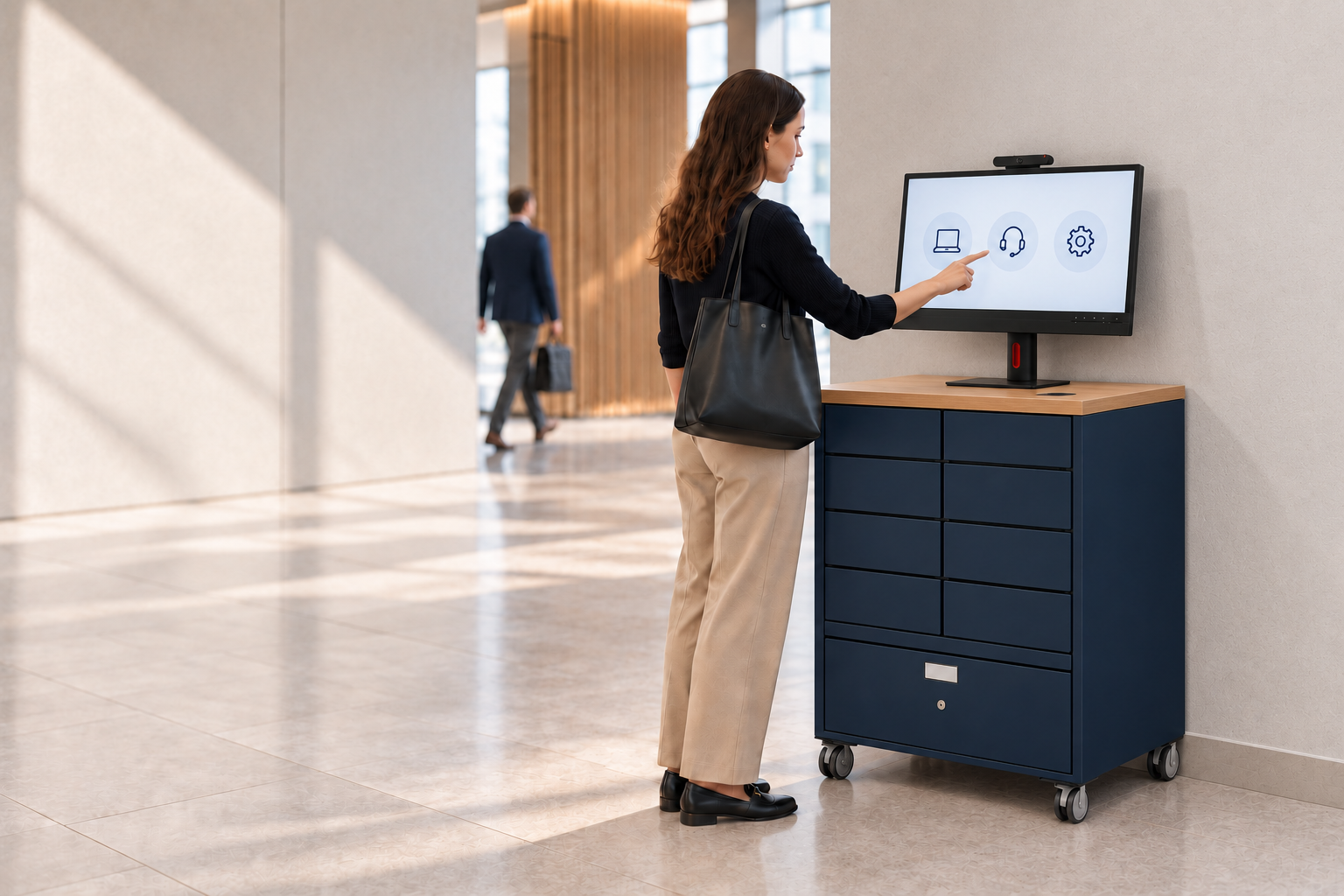
Smart Kiosks — instant IT support at every site, without the tech bar.
Live video helpdesk, remote device control over IP KVM, and eight integrated locker cells in a single workstation. Scale on-site IT support across distributed offices without scaling headcount. NPS +94 from enterprise IT teams.
What is a smart kiosk?
A smart kiosk is a self-service touchscreen terminal that lets someone complete a task on their own, with no queue, no counter and no member of staff standing beside them. You already meet them when you check in at the airport, order at a quick-service restaurant, or collect a parcel from a locker.
Velocity builds smart kiosks for one job in particular, and that is IT support. Our Smart Kiosk pairs the self-service screen with a live video helpdesk, secure remote control of the device over IP KVM, and integrated locker cells for swapping hardware, so an employee resolves most IT issues on the spot and your team supports every site without putting an engineer in every building. Enterprise IT teams rate it NPS +94.
The payoff is the one that runs through everything we make. Teams see more than 30% less onsite IT support and 45 to 60% fewer hardware and service-desk tickets, and most reach a return inside year one.
Book a call to size it for your sitesHere's a Smart Kiosk closing a break-fix ticket.
Live video to a remote engineer. Remote control of the device. Locker cells for the swap. All in one terminal — no truck-roll, no tech-bar queue.
What is a smart IT support kiosk?
A smart IT support kiosk is a self-service workstation that connects employees to live IT engineers over video, gives the engineer secure remote control of the device through IP KVM, and includes integrated locker cells for collecting replacement hardware or returning broken kit.
The result: most IT support resolutions happen at the kiosk — without an onsite engineer, without a tech bar queue, without shipping the device anywhere.
How the Smart Kiosk works.
Four steps. Most IT support tickets close at the kiosk, in minutes, without dispatching anyone.
What's in the Smart Kiosk.
A single workstation that combines three capabilities — live video support, remote device control, and physical device exchange — into one piece of furniture that fits any corporate site.
Live video helpdesk
HD touchscreen, camera, microphone array and speakers. Connects to your remote IT support team or to a Velocity-managed video resolver group, 24/7. Human-led, not chatbot.
IP KVM remote control
IP-based keyboard-video-mouse. The remote engineer takes full control of the employee's device — diagnose, configure, fix — over a secure connection. No physical presence needed.
Eight integrated locker cells
Eight laptop-sized cells per kiosk, remotely opened by the support agent. Secure 24/7 drop-off for broken kit and collection for replacements. No need for a separate locker bank.
Two screens. One Smart Kiosk.
Both models share the same capabilities — live video helpdesk, IP KVM remote control and eight integrated locker cells. The difference is the screen, the footprint, and the kind of site each one suits.


Why the Smart Kiosk beats the alternatives.
Amazon Connect enabled — and designed to work with Genesys too.
When self-service isn't enough, one tap on "Call for Help" starts a live two-way video call to your support team — over the contact centre you already run. No new platform, and no new vendor in the call path.
Amazon Connect and Amazon Chime are trademarks of Amazon.com, Inc. or its affiliates.
Smart Kiosk is now native in Smart Collect®.
Native ServiceNow integration is built, and it will be in your kiosk.
Development is complete. Every kiosk session, every IP KVM diagnostic and every video call becomes a first-class ServiceNow record inside the Smart Collect® application, alongside the locker and vending workflows that have run natively from the start. We can show you the working product today.
It reaches customers in the next Smart Collect® release. Smart Kiosk hardware takes around eight weeks from order to delivery, so a kiosk ordered now arrives with the native integration already in place. Nobody ordering today ends up on the older architecture.
One application, one audit trail. All three Smart Collect® form factors, kiosks, lockers and vending, share the same data model inside your own ServiceNow tenant. Device custody, support interactions and hardware movements sit where your service desk already works, with no separate console to learn and no middleware to maintain. Open API integration with other enterprise ITSM platforms remains available for organisations not running ServiceNow.
For your IT team. For your employees.
Two audiences, one device. The IT leader gets cost-to-serve down; the employee gets the wait removed.
For IT leaders
- Scale on-site IT support across distributed offices without scaling headcount
- Most break-fix tickets resolved remotely — no engineer dispatched
- Centralised IT engineering team can serve every site, every shift
- Every interaction logged, audit-ready, reportable
- Integrated locker cells mean no separate hardware-collection bank needed
For employees
- 24/7 access — no waiting for IT business hours
- Real engineer over video — not a chatbot, not a knowledge-base search
- Most issues fixed in minutes, not days
- If the device needs replacing, collect the loaner from the same kiosk
- NPS +94 from enterprise IT teams that have deployed Smart Kiosks
Three steps to live Smart Kiosks.
Put a number on the tech bar.
Every gain on this page comes out of time your team currently spends walking to desks and staffing a support point that has to be manned. What that costs is almost never measured, because deskside support is absorbed into headcount rather than shown as a line anyone can challenge.
Two ways to size it before you take the idea to anyone who controls budget.
The Deskside Support Cost Benchmark
Twelve questions about how your team runs device support today. No spreadsheet, no digging through ticket exports, nothing to prepare.
- Twelve questions, every one multiple choice
- Around three minutes, start to finish
- Your annual deskside support cost, calculated from your answers
- How your handover times, wait times and kit recovery rates compare with other enterprise IT teams
The Smart Collect® ROI Calculator
If you already know your ticket volumes, your sites and what an engineer costs you, skip the diagnosis and go straight to modelling the saving.
- Savings modelled against your own volumes, not an industry average
- Payback period and multi-year return
- A written breakdown you can take into a budget conversation
Both are free. The benchmark sends your result by email, so you will need a work email address.
Smart IT support kiosks — common questions.
Replace your tech bar with a Smart Kiosk.
A 60-minute discovery workshop maps your sites, your existing support coverage, and where Smart Kiosks would deliver the biggest impact on cost-to-serve and resolution time.